
XK-M08 Handheld Windows Ground Control Station
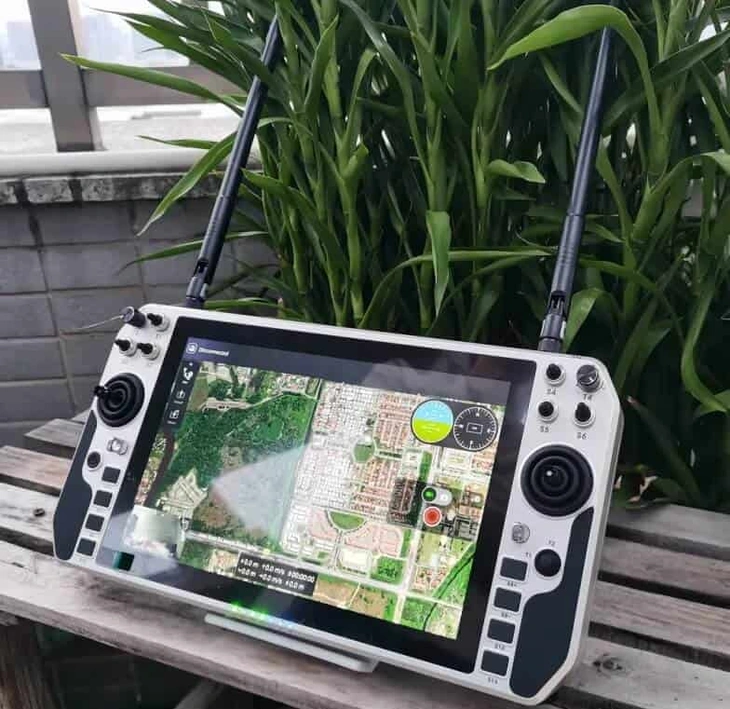
XK-M08 combines a Windows PC and physical controls in a handheld ground station. Its 10.1-inch anti-glare capacitive touchscreen, two control sticks and eight customisable keys suit projects that need software interaction and direct control inputs from the same portable terminal.
- Intel i7-7500U with 8 GB DDR4 and a 256 GB SSD gives a defined PC configuration for your application requirements.
- Windows 10, 64-bit, provides the listed operating-system environment; mission software is specified separately.
- Two control sticks, eight customisable keys and a dedicated emergency-stop control provide distinct input resources.
- Network, USB, HDMI and serial connections allow the proposed vehicle and peripheral arrangement to be specified.
XK-M08 Handheld Windows Ground Control Station Overview
Choose XK-M08 when a handheld format is important but the project still calls for a Windows PC environment. The 10.1-inch touchscreen has an anti-glare finish and capacitive input, allowing on-screen interaction alongside the physical control sticks and keys.
The listed configuration uses an Intel i7-7500U processor, 8 GB DDR4 memory and a 256 GB SSD. Memory expansion up to 32 GB is a configuration capability, not the standard supplied capacity. The operating-system listing is Windows 10, 64-bit.
Xingkai checks the application environment and the required control, network and peripheral connections, then provides a configuration quotation. The emergency-stop control is a hardware input; the connected system must determine its action. Specify the software and control arrangement so the quotation identifies the station and accessories needed for your project.
Technical Specifications
The table describes the listed model configuration. The quotation identifies the configuration and accessories supplied.
| Parameter | Listed configuration |
|---|---|
| Format | Handheld ground control station |
| CPU | Intel i7-7500U |
| RAM | 8 GB DDR4; maximum supported 32 GB |
| Storage | 256 GB SSD |
| Display size | 10.1 in |
| Display brightness | 600 cd/m² |
| Touch surface | Capacitive; anti-glare finish |
| Operating system | Windows 10, 64-bit |
| Control sticks | 2 |
| Customisable keys | 8 |
| Other controls | 1 emergency-stop control; 4 button switches; 1 power button |
| Listed peripheral connections | Network; 4 × USB; HDMI; audio; SIM; COM and LAN aviation connectors |
Connections and Integration
List the M08 terminals against its four USB connections, network path and COM/LAN aviation connectors. Give each serial terminal’s electrical specification and the required video-source/application path so Xingkai can identify the cable and interface scope; HDMI alone does not define camera input.
The two sticks, keys and emergency-stop control need the selected system mapping. Xingkai checks that connection arrangement for the quotation. The emergency-stop input does not, by itself, establish a certified safety circuit or a particular vehicle stop response.

Configure and Order Your Station
For your XK-M08 enquiry, specify the Windows application, terminal interfaces, required control functions and station quantities. Xingkai checks the model and configuration, then provides a quotation for the station and agreed accessories.
Confirm the supplied configuration, quantities and delivery terms before ordering. These agreed details form the basis for supply and dispatch.
Send the Windows application and terminal list for the M08’s i7-7500U, 8 GB, 256 GB SSD reference. Identify any requested RAM upgrade separately from the 32 GB supported maximum, with the required control/stop-command path, COM/LAN connections and quantities.
Xingkai checks the selected M08 PC, terminal connections and control arrangement, then quotes the hardware, COM/LAN and peripheral harnesses and agreed software scope. The configuration identifies the emergency-stop mapping responsibility and the actual memory supplied rather than assuming maximum RAM or a ready-configured vehicle response.
Agree on the supplied configuration, quantities and delivery terms.
Xingkai arranges supply and dispatch according to the confirmed order.
FAQs
No. The operating-system listing identifies the PC environment, not every mission application or licence. Name the software, version, licensing arrangement and any required peripherals in your enquiry. Xingkai checks the requested configuration against that environment. Confirm the software supply scope in the quotation rather than assuming that a Windows station includes the complete application package.
Record each vehicle’s required stop action, command interface and corresponding M08 application/mapping version. Identify who maintains that configuration and how the correct arrangement is selected before changing vehicles. Request those records with the proposed connection scope rather than assuming the same emergency-stop assignment applies to every platform. The control’s presence does not establish a common stop response across vehicles or a separately certified safety circuit.
Send the application’s recommended CPU, memory, graphics and storage requirements, its version and the peripherals or video sources it will use. These requirements help distinguish a suitable PC configuration from one selected only by the processor name. Xingkai identifies the proposed components in the quotation. The listed hardware does not establish application performance, so agree any application validation you need separately.
Provide the installed M08 hardware identification, the terminal connection details and the existing harness drawing or part identification if available. Request the replacement’s mating-connector identity, signal allocation and both cable ends to be named for that unit. COM/LAN function labels do not identify a complete spare harness or prove its electrical arrangement. Agree that part specification before buying a cable by connector appearance.
A SIM connection does not identify the supplied modem, carrier bands or subscription. For a cellular project, state the operating country, network and required communication hardware. Xingkai can identify the proposed hardware scope in the quotation. Confirm modem inclusion and the service arrangement separately so the station order does not rely on an assumed mobile-data package.
Compare Related Models

Compare a 15.6-inch upper display and 12.1-inch lower display with standard and upgrade PC configurations.

Consider three two-axis joysticks and two 13.3-inch displays for unmanned ground vehicle and robot projects.
Compare the separately listed handheld model with a 10.1-inch display and 18 control channels.
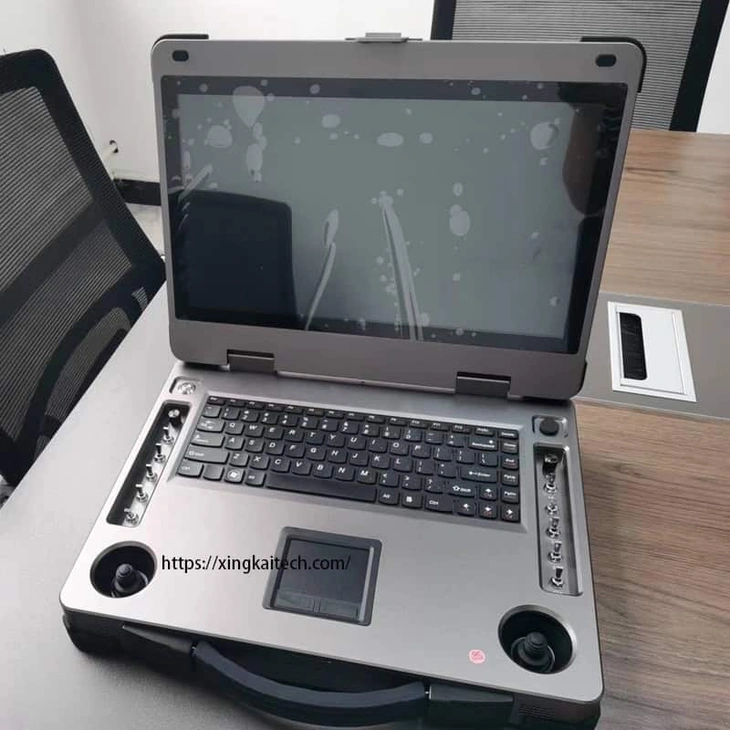
Consider a single 15.6-inch display and physical controls when a dual-screen layout is unnecessary.
Request a Configuration Quote for XK-M08
Tell us the Windows application, terminal interfaces, required control functions and station quantities. Identify any radio, air unit, cables or other accessories you want included. Xingkai checks the proposed XK-M08 configuration and provides a quotation.