
XK-H10 Handheld Ground Control Station
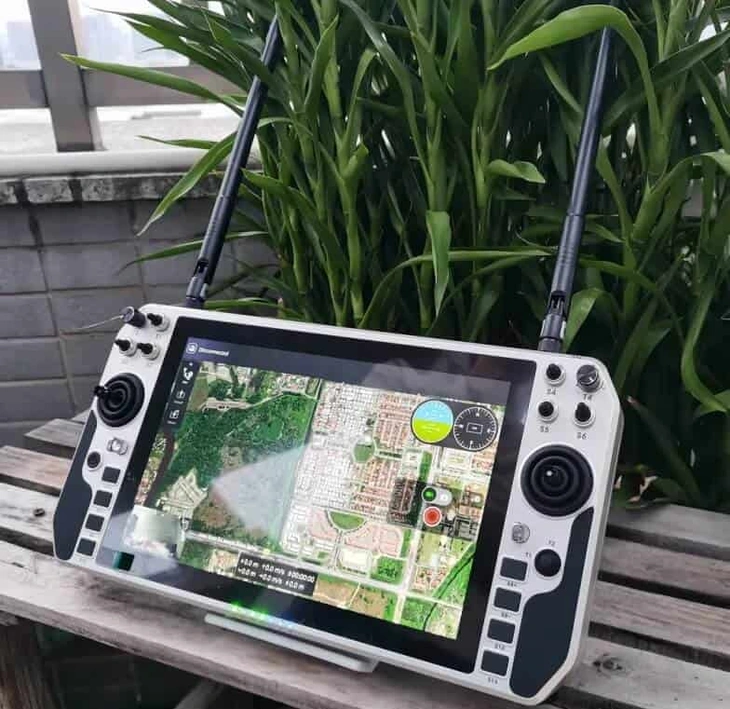
XK-H10 is a handheld PC ground control station with a 10.1-inch display and 18 control channels. Its listed 1.6 kg weight and 335 × 184 × 40 mm dimensions suit projects that need a terminal carried in the hands, with network video access and physical controls in the same device.
- A 1280 × 800 display with 10-point touch provides an on-screen interface alongside the joysticks and switches.
- The standard PC listing is seventh-generation Intel i5, 4 GB memory and a 128 GB SSD; CPU options are specified separately.
- Two joysticks, a thumb stick, roller switches, six toggle switches and two knobs give distinct physical inputs.
- LAN RTSP video access and a Gigabit RJ45 connection define the listed network-video route.
XK-H10 Handheld Ground Control Station Overview
XK-H10 provides a handheld alternative to a larger portable workstation. The 10.1-inch display and physical controls are housed in a terminal specified at 1.6 kg. For a project that requires frequent movement with the controls in hand, that format is a different choice from a multi-screen station placed on a working surface.
The listed standard PC configuration is an Intel i5 with 4 GB memory and a 128 GB SSD. Windows 7, Windows 10 and Linux are operating-system choices. Select the environment around the intended application rather than assuming that an operating-system option includes the mission software.
Xingkai checks the PC, control and video connection requirements, then quotes the station and agreed accessories. This page covers the separately listed XK-H10 model; the H10W is another model and its operating-system, control-channel and battery figures should not be substituted here.
Technical Specifications
The table describes the listed model configuration. The quotation identifies the configuration and accessories supplied.
| Parameter | Listed configuration |
|---|---|
| Display | 10.1 in; 1280 × 800 |
| Touch input | 10-point |
| CPU options | 7th-generation Intel i3/i5/i7; standard i5 |
| Memory | 4 GB |
| Standard SSD | 128 GB |
| Graphics | Intel HD Graphics 620 |
| Operating-system options | Windows 7 / Windows 10 / Linux |
| Ethernet | 1 Gigabit RJ45 |
| External connections | 2 × USB 3.0; 1 × LAN; 1 × HDMI |
| Control channels | 18 |
| Controls | 2 joysticks; 2 roller switches; 1 thumb stick; 6 three-position toggles; 2 knobs; 6 buttons |
| Station video access | LAN RTSP video stream |
| Battery | 16.8 V; 8000 mAh |
| Charging-voltage listing | 19–24 V |
| Dimensions | 335 × 184 × 40 mm |
| Net weight | 1.6 kg |
| Operating temperature | −20 to +60 °C |
Connections and Integration
The H10 lists LAN RTSP video access at the station, so the network-video format and the selected display application are central to the integration. USB and HDMI are separate external connections; their presence does not prove a particular camera-input or control-protocol arrangement.
For a complete link enquiry, identify both the station and remote equipment. Xingkai checks the proposed configuration and accessory list. Air-unit dimensions, weight and electrical ratings describe that separate component and must not be used as handheld-station specifications.
Configure and Order Your Station
For your XK-H10 enquiry, specify the PC operating system, RTSP video source, control requirements and station or remote-unit quantities. Xingkai checks the model and configuration, then provides a quotation for the station and agreed accessories.
Confirm the supplied configuration, quantities and delivery terms before ordering. These agreed details form the basis for supply and dispatch.
For H10, send the PC/operating-system choice, LAN RTSP source and required 18-channel control task, with station and remote-unit quantities listed separately. Identify the 16.8 V, 8000 mAh battery reference and charging equipment needed for the listed 19–24 V charging arrangement.
Xingkai checks the H10’s actual control-output format, RTSP application path and station power configuration, then quotes the handheld, charging items and any agreed remote radio or interface accessories. The station and remote unit retain separate electrical specifications and item quantities.
Agree on the supplied configuration, quantities and delivery terms.
Xingkai arranges supply and dispatch according to the confirmed order.
FAQs
Request a control-assignment list for the supplied H10 version, naming each required function, physical input and channel, together with the output format accepted by the target controller. Identify any unused inputs and who configures the application or remote-end mapping. The H10 table lists 18 channels without establishing that particular format or mapping. Approve that function-by-function arrangement before treating the handheld as a ready-configured controller for your vehicle or payload.
The station's video-input listing is LAN RTSP. If the camera or receiver has another output, identify its model and output type so the proposed conversion or encoding path can be checked. Xingkai identifies the required equipment in the configuration quotation. A LAN connection alone is not proof that every network camera or non-network video source will display directly.
Have the two loads and connections specified separately. H10 lists a 16.8 V, 8000 mAh battery and a 19–24 V charging-voltage entry; the remote unit needs its own applicable supply specification. Provide the proposed source’s outputs and current capability, then request the handheld charging and remote-power leads and requirements as separate items. The charging entry does not establish a common power cable or a suitable supply for both components.
The operating-system choice does not identify the mission application, its licence or the required drivers. State the application, version and control-input requirements in your enquiry. Xingkai checks the requested configuration and identifies the agreed supply scope in the quotation. Confirm the software arrangement separately rather than assuming that the PC environment establishes application compatibility or inclusion.
Provide the full station model, hardware and firmware identification where available, the video-stream format and the connected control equipment. Similar model names or a shared frequency do not establish replacement compatibility. Xingkai checks the proposed configuration before quoting another station. Also identify any charger, cable or remote unit that you want supplied with the replacement.
Compare Related Models

Compare a 15.6-inch upper display and 12.1-inch lower display with standard and upgrade PC configurations.

Consider three two-axis joysticks and two 13.3-inch displays for unmanned ground vehicle and robot projects.

Compare a handheld Windows PC terminal with a 10.1-inch capacitive touchscreen and physical controls.
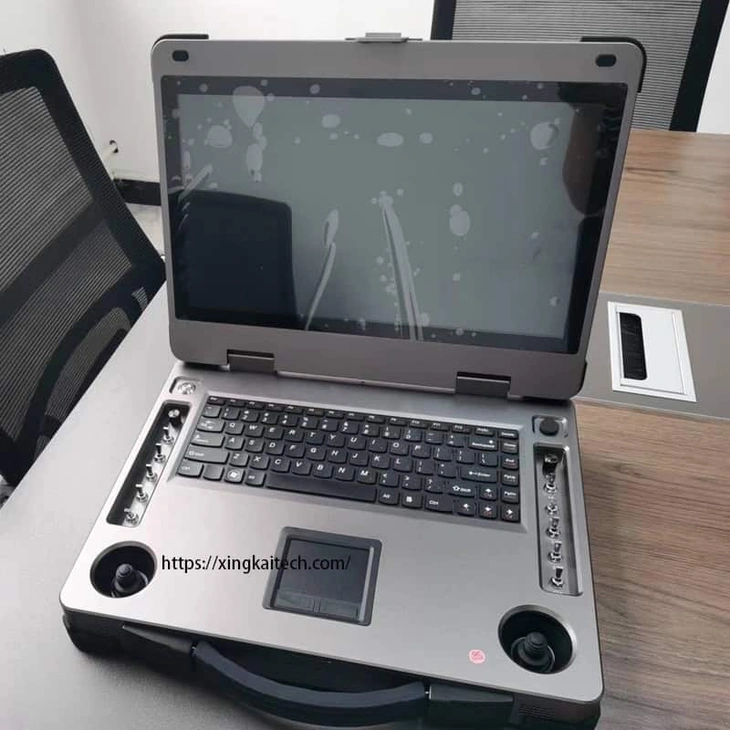
Consider a single 15.6-inch display and physical controls when a dual-screen layout is unnecessary.
Request a Configuration Quote for XK-H10
Tell us the PC operating system, RTSP video source, control requirements and station or remote-unit quantities. Identify any radio, air unit, cables or other accessories you want included. Xingkai checks the proposed XK-H10 configuration and provides a quotation.